
Control lead-on and lead-off lights
Before first use, check EuroScope settings.
Lead-on lights
Section titled “Lead-on lights”Green or green+amber centerline lights beyond a stop bar. When you clear the bar, they lead the aircraft from the holding point onto or across the runway. Pilots see them in the sim; you control which line lights. Concept: the lights explained.
A bar can carry multiple lines. Someone has to choose which one lights. Either XPGuard chooses automatically, or you do.
Automatic (default)
Section titled “Automatic (default)”With Automatic on clearance on, clear a bar with a left-click as usual. XPGuard reads the traffic at the bar, picks the line for the aircraft, and lights it. The picked line shows where Show lead-on indicators says - on the main radar or in a mini window - for the indicator duration.
Whenever a clearance lights nothing - no traffic at the bar, two aircraft, no clear
candidate - the pick is handed to you, in both modes. The candidates come up where the
indicator setting says. On the main radar the bar’s menu opens for you; in mini-window
mode the window pops up; with indicators off, the bar menu opens by itself. Pick a
line and it lights. Re-arming the bar (setting it red again) closes the question.
Picking by hand
Section titled “Picking by hand”Turn Automatic on clearance off and every choice is yours. A left-click on a lit bar that carries lines does not clear it. The candidates come up and the bar stays red until you pick - picking the line is the clearance: one click lights the line and clears the bar.
With indicators off, a left-click clears the bar as usual and the bar menu opens for
your pick.
The main-radar indicator
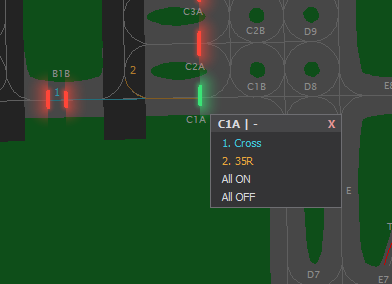
Section titled “The main-radar indicator”Numbered colored lines drawn at the bar - only while that bar is asking for a pick or showing an answer, never permanently. The lit line draws solid and thick; the rest are thin and dim. The numbers sit at the far end of each line, where they diverge. The drawn lines are information only - the pick happens in the menu, which opens for you.
The mini window
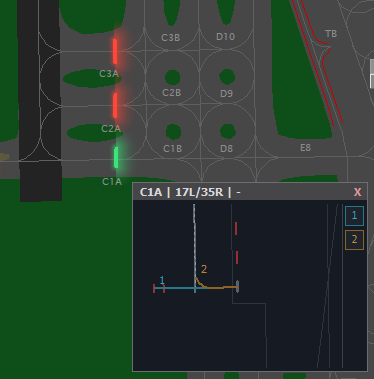
Section titled “The mini window”At a busy field the candidate lines are a few pixels on a zoomed-out scope. Set
Show lead-on indicators to mini window and each asking or answering bar gets a small
panel beside it instead (at most 4 at once):
- Titled
<bar> | <runway> | <callsign>- the bar, its runway, and who the question is about. - Draws the real pavement from your sector file, rotated the way your scope is.
- Drag it by the title bar;
Xcloses it.Close all mini windowsin the LEAD-ON section closes every one and resets dragged positions. - Click a line in the window to pick it. That lights the line and clears the bar too.
- Or click the numbered button on the window’s edge - same pick, easier target.
The bar menu (right-click)
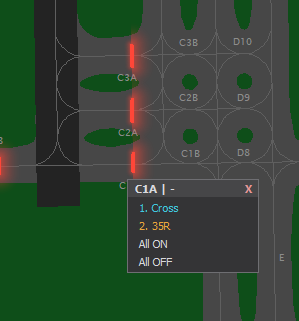
Section titled “The bar menu (right-click)”Right-click any stop bar to open its menu - on every bar, lines or not.
- One row per line:
1. <runway>(orCrossfor a crossing), plus the mapper’s note. A*marks a lit line. - Each row is a toggle and the menu stays open - light two entrances off one clearance, or click a line again to darken it.
- All ON lights every line and clears the bar.
- All OFF is the override - it darkens every line at this bar, including one an aircraft is still crossing.
- Lighting any line clears the bar.
- A bar with no lines says
(no lead-on lines at this bar). A runway you have not claimed says(you have not claimed this runway). - There is no Permanent row -
Shift+clickon the bar is that.
What runs on its own
Section titled “What runs on its own”- A lit line follows the crossing aircraft and goes dark behind it by itself.
- A lit red bar standing across a line caps how far it burns - the drawn line dims past it.
- An out-of-service (INOP) line never lights, whatever picks it.
After the aircraft crosses the bar
Section titled “After the aircraft crosses the bar”Real lead-on segments are switched by surface sensors as the aircraft passes them. There are no sensors on VATSIM, so XPGuard models them from your ground radar:
- The line is divided into blocks. The first block ends where the row enters the runway, so the lights behind the aircraft go dark as it lines up - not before.
- A target counts as being on the line only inside a corridor around it, moving the line’s way at taxi speed - an aircraft vacating the other way, or one on the parallel taxiway, never trips it.
- Whatever the blocks say, lights further than ~30 m behind the rearmost aircraft on the row are dark - so the next departure holding at the re-armed bar never reads a full lit lead-on as its own clearance.
The multi-aircraft flow follows from one rule - once an aircraft is past the bar, the line belongs to that transit, not to the bar:
- You clear the bar; the line lights; the aircraft starts to cross.
- You re-arm the bar for the next aircraft (left-click, or
Auto bardoes it after its delay). The crosser’s line stays lit and keeps following it - re-arming darkens a line only when nothing ever crossed. - The next clearance is its own question: a fresh pick for the next aircraft, while the first one’s lights keep trailing it to the runway.
- The line goes out when every transit completes - lined up on the runway, or off the far end of a crossing line. Backstops cover the radar’s blind spots: a clearance nobody takes releases the row after ~30 s, a transit that stops advancing after ~120 s.
Lead-off
Section titled “Lead-off”Lead-off lights are the runway-exit strings - they lead a landing aircraft off the runway. Each lead-off row serves one landing runway.
The Lead-off row in the LEAD-ON section cycles through three modes. Your chosen mode applies to the runways you hold. XPGuard checks it again every few seconds.
| Mode | What it does |
|---|---|
Active Rwy (default) |
Rows whose runway is active for arrival in EuroScope’s active-airport window stay on; every other row on your runways is switched off. Change the active runways and the rows follow within a few seconds. |
On |
Every lead-off row on your runways is on. |
Off |
Every lead-off row on your runways is off. |
Crossings (rows with no landing runway) are left alone in Active Rwy and follow On / Off.
Rows on runways you do not hold are never touched.
A lead-off switch lasts only while you hold the runway: release the claim (or disconnect) and the server puts those rows back to the taxiway’s own lighting for everyone.
Next: Use REL and THL.