
EuroScope settings
The XPGuard button & menu
Section titled “The XPGuard button & menu”- The button is draggable - move it anywhere on the radar.
- Click it to open the menu.
- Drifted off screen?
.xpg recenterbrings it back to its default corner.
Settings
Section titled “Settings”Click the XPGuard button to open the menu. The per-light-family settings live under four collapsible sections - BAR, IHP, THL, REL and LEAD-ON.
Some of your settings may be forced by a vACC. A forced setting shows (vACC) next to its value.
Top-level switches
Section titled “Top-level switches”| Row | What it does |
|---|---|
LVP (CAT II/III bars) |
Declare LVP for an airport you control. With one airport, click to toggle. With several airports, choose each one in the picker. See declaring LVP. |
FTG |
Open the Follow the Greens traffic panel (open while it is). |
Lighting control panel |
Open the browser lighting panel when your account has access. See Lighting Control Panel. |
Show XPG status on traffic |
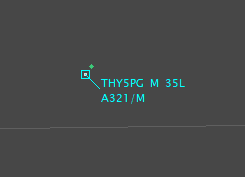
Show a green dot on the radar tag of a pilot running XPGuard. The dot identifies the client; it does not confirm the pilot has seen a particular light. |
BAR section
Section titled “BAR section”| Row | Values |
|---|---|
Auto bar |
Off by default. When on, a bar you clear with a left-click re-lights itself after a delay (default 45 s). A bar pinned with Shift+click (permanent, marked *) is never re-armed. |
Bar style |
Cycle the stop-bar drawing - see below. |
Bar size |
Cycle 1-5. Scales the bars in every style; 3 is the default value. |
Show CAT II/III only in LVP |
Declutter: hide unlit CAT II/III bars from your scope while LVP is off. Display-only - the bars keep their state and pilots always see them. |
Apron bars |
normal ↔ dim. Dim shrinks and fades every APRON bar so runway holds stand out; a lit apron bar stays clearly red. Tune with .xpg apron. |
Hide No Entry bars |
Declutter: hide no-entry bars from your scope. Display-only - pilots always see them. |
Hide unclaimed |
Off by default. When on, a stop bar whose runway no controller holds is not drawn on your scope at all, lit or not. It comes back when any controller claims the runway. Display-only - pilots always see it. |
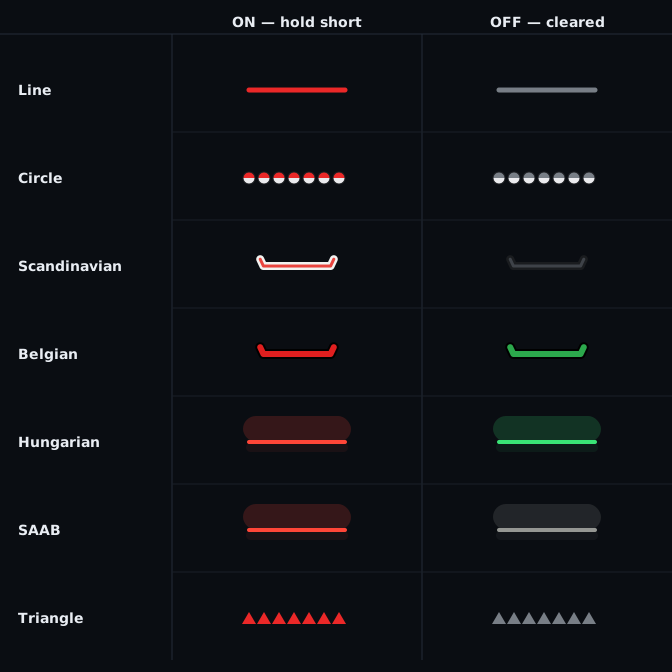
Bar style cycles through seven drawings, in this order:
| Style | |
|---|---|
line |
A plain straight bar |
circle |
Round fixtures (the default) |
Scandinavian |
|
Belgian |
|
Hungarian |
|
SAAB |
The Hungarian drawing with a pale-gray OFF - the Saab A-SMGCS look |
Triangle |
Solid triangles on the hold line, every apex toward the holding side; a bidirectional bar draws diamonds. |
IHP Section
Section titled “IHP Section”| Setting | What you see |
|---|---|
| All IHP Automatic | Revert all IHP lights to automatic. |
| Hide IHP: None | Show every IHP. |
| Hide IHP: Auto | Hide dark IHP-only bars that cannot be switched manually. |
| Hide IHP: All | Hide every IHP-only bar, and the dots of combined stop bars. Combined stop bars stay. Out-of-service bars stay visible. |
| Hide unclaimed | Off by default. When on, an IHP-only bar whose runway no controller holds is not drawn, lit or not, and neither are the dots of such a combined stop bar. |
| IHP display: dots | Three amber dots beside a combined stop bar. Filled means lit; dim outlines mean off. |
| IHP display: color | The combined bar becomes amber when IHP is lit. Red still takes priority. |
| IHP display: combined | Dots on a combined stop bar, color on an IHP-only bar. |
| IHP size | Cycle 1-5. Scales the IHP dots, and an IHP-only bar drawn in color. A combined stop bar keeps its bar size. 3 is the default value. |
THL section
Section titled “THL section”| Row | Default | Range | What it does |
|---|---|---|---|
THL horizon |
12 s |
3-30 s | How many seconds ahead THL anticipates a crosser. Click the row to type a value. |
THL sound |
off | - | One short alert when a runway’s THL lights for an anticipated incursion. |
REL section
Section titled “REL section”The defaults follow the published RWSL behavior. You rarely need to move them.
| Row | Default | Range | What it does |
|---|---|---|---|
Anticipated separation |
3.0 s |
1-8 s | How many seconds before the traffic reaches an entrance the row releases. Larger releases earlier. |
Departure altitude filter (>) |
300 ft |
100-600 ft | ft AGL above which a departure is gone and stops holding rows. |
Departure velocity filter (>) |
8 kt |
0-30 kt | The speed at which a controller-declared departure counts as rolling. Set 0 (any speed) and a declared departure holds its entrances the moment it is lined up, stationary or not. |
Arrival time window |
30 s |
10-120 s | How many seconds from the threshold an approach starts lighting the entrances. |
Show REL indicators |
on | - | Draw the rows on your scope. Off hides them; the lights still run. |
LEAD-ON section
Section titled “LEAD-ON section”The controls for lead-on lights.
| Row | Default | What it does |
|---|---|---|
Show lead-on indicators |
main radar |
Where the candidate lines appear: off / main radar / mini window. |
Automatic on clearance |
on | Clearing a bar lets XPGuard pick and light the lead-on line by itself. Off: you pick - see picking by hand. |
Lead-off |
Active Rwy |
Click to cycle Active Rwy / On / Off. See Lead-off. |
Indicator duration |
5 s |
How long the indicator stays up after a pick. Click to type 0-600; 0 = until the bar is red again. |
Close all mini windows |
- | Shown only while mini windows are open (N open). Closes them all and puts dragged ones back in their default places. |
Set / change token
Section titled “Set / change token”The bottom row reads Set token until a token is saved, then Change token. Click it to
start the browser sign-in. While a link is pending the row itself
becomes Waiting for browser sign-in - <code> - cancel.
Next: Take your claims.