
Take and release claims
The XPGuard button & menu
Section titled “The XPGuard button & menu”- The button is draggable - move it anywhere on the radar.
- Click it to open the menu.
- Drifted off screen?
.xpg recenterbrings it back to its default corner.
Status dot:
| Color | Meaning |
|---|---|
| Gray | No token set - you cannot control anything |
| Green | Token set and the server is reachable |
| Amber | Token set, but the server is currently unreachable |
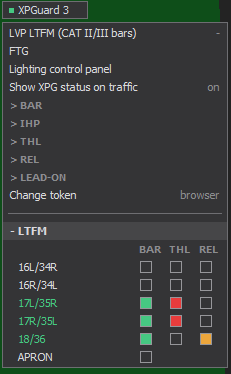
The number on the button (XPGuard 3) is how many runways you currently hold a
BAR claim on. That count includes claims at airports EuroScope no longer lists as active.
LVP in yellow on the button, with a yellow tab on its edge: at least one of your
airports is under LVP.
Below the switches, each active airport is a collapsible + ICAO header. Expand it. Every
runway row carries up to three checkboxes: BAR · THL · REL.
- Claim a runway: tick its BAR box. A runway held by someone else shows their callsign, its box filled muted-red, and refuses the click.
- Release it: un-tick the box.
Claims you still hold at airports that left the active list appear under a NOT ACTIVE - still held block - click a box there to release them.
Check which claims you can take
Section titled “Check which claims you can take”Your VATSIM facility, rating and callsign determine which claims you can take. For an own-airport position, the callsign must identify that airport.
| Position | May claim |
|---|---|
Delivery / Ground / Tower (_DEL / _GND / _TWR) |
Your own airport only - your callsign must name your airport. LTAC_TWR claims LTAC, and US positions using FAA IDs work too (SLC_TWR claims KSLC). |
Approach / Departure / Center / FSS (_APP / _DEP / _CTR / _FSS) |
Top-down: any airport you cover. (A _TMU flow position is own-airport only.) |
In all cases:
- You must be signed in with VATSIM Connect. An email/password account cannot claim anything, whatever its token.
- The callsign you claim with must be the one you are connected under.
- A runway is held by one controller at a time. EuroScope names the holder and refuses the click - its box fills muted-red.
- Switching callsign releases what you held under the old one.
When claims drop:
- A clean disconnect or unloading the plugin releases claims immediately. With a second EuroScope (proxy) of yours still connected, they stay.
- After a crash the server expires them ~90 s after the last heartbeat.
- The server also re-checks claims against the live VATSIM feed:
- Never appearing within ~5 min releases a claim as unverified. New claims are then blocked ~10 min.
- A verified claim’s controller leaving the feed for ~5 min expires it. New claims are then blocked ~3 min.
- A live position change that makes you ineligible drops the claim immediately.
- Reconnecting under the same callsign clears any block at once.
APRON - shared apron / ground bars
Section titled “APRON - shared apron / ground bars”- Bars on the apron, or a taxiway belonging to no runway, are grouped under an APRON claim. Contributors tag them in the editor.
- APRON is the one shared claim. Any eligible position - Ground, Tower, top-down - may hold it at the same time. Its box is never filled muted-red when others hold it.
- Who switches which bar is coordinated verbally. Everyone sees the live state, and the system picks no owner.
- APRON has no THL. Its row appears once an airport has apron bars.
Next: Switch stop bars and IHP.