
Add FTG to EuroScope lists
Before first use, check EuroScope settings.
FTG from the departure and arrival lists
Section titled “FTG from the departure and arrival lists”Run FTG from the departure and arrival lists instead of hunting tag badge or the legacy FTG panel. XPGuard registers two columns and 19 functions; you place and bind them yourself.
Add a column
- Open the departure list → the small S in its title bar (List Columns Setup).
- Add Item → Tag Item type →
XPGuard / FTG status. - Left button and Right button are separate slots - pick any
XPGuard / …function for each. - Repeat for
XPGuard / FTG route. OK, then the same on the arrival list. EuroScope saves it with your profile.
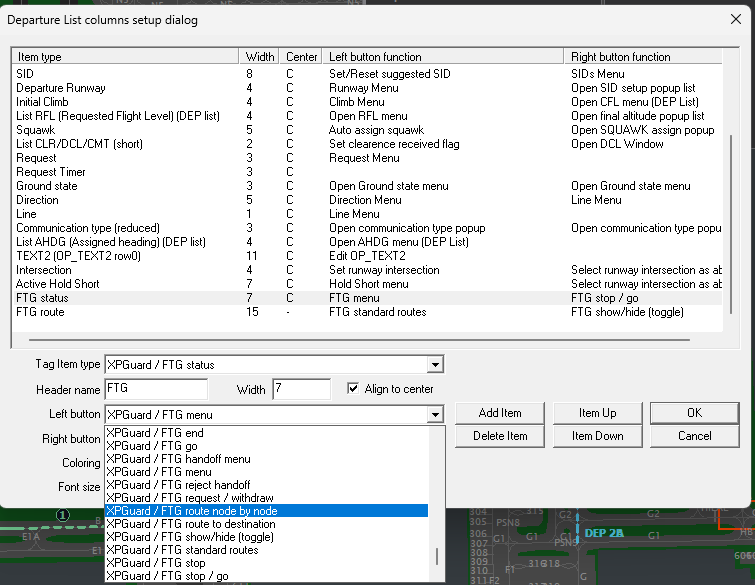
Suggested: FTG column left = FTG menu, right = Handoff menu. RTE column left =
Stop/Go toggle, right = FTG show/hide (toggle).

Tag items
| Item | Cell |
|---|---|
FTG status |
The session state. With no session, capability: green [x] = FTG-capable, gray [ ] = XPGuard client that cannot do FTG here, empty = no XPGuard. |
FTG route |
The route’s taxiways. Green = sent, blue = draft, amber = stopped. Pale = hidden on your scope. |
Status words: REQ (REQ@TWR = another position asked) · REJ · DRAFT · ACC (no route
yet) · SEND? (draft parked) · SENT · EDIT · AT END (blinking) · STOP · DISC ·
HO? (offered to you) · HO>GND (your offer pending) · @GND (another controller’s) ·
ADOPT?.
Functions - bind them in the S dialog:
| Function | What a click does |
|---|---|
FTG menu |
Opens the FTG menu under the cell. |
FTG handoff menu |
The FTG menu with the handoff flyout open. |
FTG show/hide (toggle) |
Show or hide the route on your scope - the route cell’s color is the state. |
FTG request / withdraw |
Request FTG; on your own pending request, withdraw it. |
FTG standard routes |
The FTG menu with the standard-routes flyout open. |
FTG route to destination · FTG route node by node |
Arm the scope for the destination click / the vias. |
FTG edit route |
Edit the sent route, or the parked draft. |
FTG confirm / send |
Send the preview, or the parked draft once the pilot has accepted. |
FTG discard / clear draft |
Drop the preview, or delete the parked draft. |
FTG stop / go · FTG stop · FTG go |
Darken / resume the greens. |
FTG clear route |
Darken the greens, keep the session. |
FTG end |
A popup asks End FTG (or Withdraw request) / Keep. |
FTG adopt |
Take over an orphaned session. |
FTG accept handoff · FTG reject handoff · FTG cancel handoff |
The handoff verbs. |
- No flight plan, no list row: use the badge or the panel.