
Submit and track your map
Review & publishing
Section titled “Review & publishing”What happens after you submit:
- Your submission queues as pending. You get a confirmation email and a status badge in My submissions.
- On approve it replaces the published bars - the Base map, or that add-on’s map - and reaches the sim almost immediately. Plugins pick it up on their next poll; no restart.
- On reject the live map is untouched. The reason reaches your dashboard and inbox, so you can fix it and resubmit.
Review is not all-or-nothing. The reviewer works bar by bar:
- Accept a bar.
- ✗ Reject it - that bar reverts to the published one.
- ✎ Edit it - they adjust it themselves.
Each ✗ and ✎ asks for a reason, and those reasons pre-fill your email. So the
published map can differ from what you sent, with a note telling you where and why. (A
reviewer may also come back with a needs-info question and an image before
deciding.)
Track everything in your dashboard → Contributions:
| Status | Meaning |
|---|---|
pending |
Queued, awaiting a reviewer. |
approved |
Published - live for everyone on that map. |
rejected |
Declined; the live map is untouched. Fix and resubmit. |
reverted |
A moderator later rolled the map back to its pre-submission state. If yours was the first map for that scenery it is unpublished entirely. The entry stays and can be approved again. |
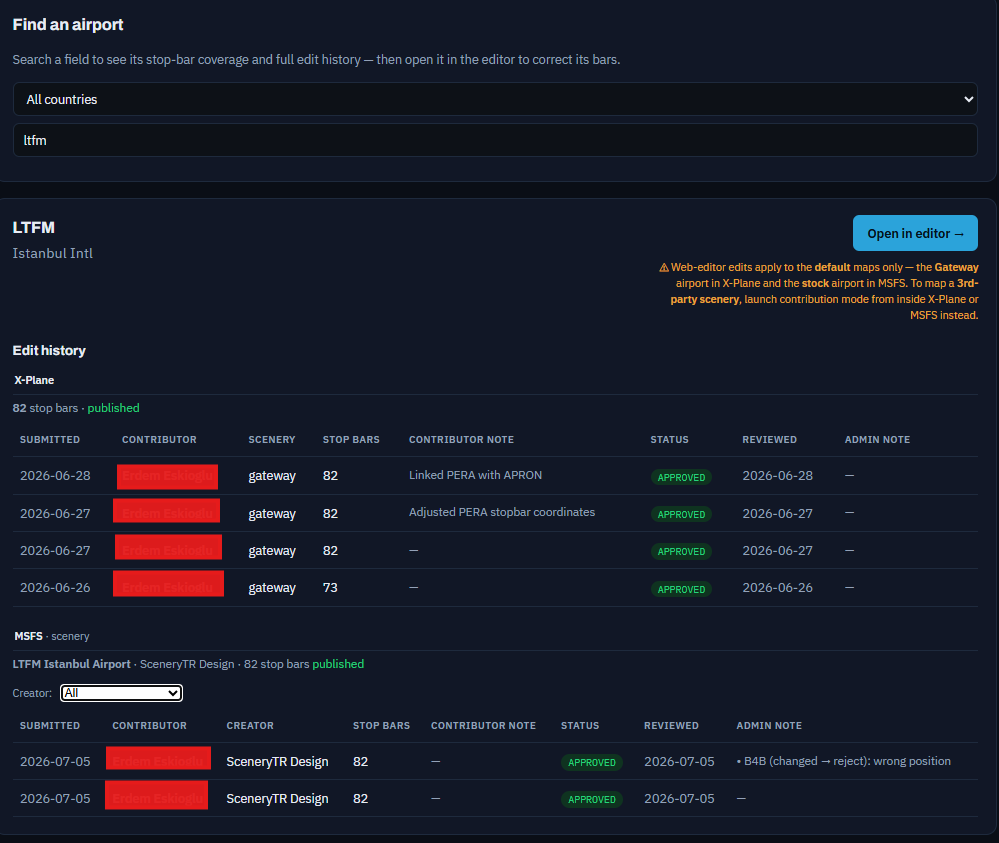
An airport’s full edit history is under Find an airport - per sim, with the scenery and who reviewed each entry. Each status badge there is a link to a read-only what changed diff.
Moderators - who reviews your map
Section titled “Moderators - who reviews your map”- Reviews are done by the XPGuard team and by community moderators.
- A moderator reviews their own countries’ airports only. One scoped to Türkiye
sees the pending
LT··submissions. (Admins are unrestricted.) - Approval works the same either way: the map is checked against the real airport and published.